RADIOCHRON DESKTOP
radiochron.com / desktop
//: THE CHRONICLE, ON SCREEN

Evidence you can
attach to a ticket

Intermittent Wi-Fi is hard to prove after the link recovers. RadioChron Desktop records baselines, compares observations, maps Wi-Fi and Bluetooth radios with the same zoomable viewport, resolves paired and connected Bluetooth devices through the OS inventory, explains 1/7/30-day presence patterns, exports evidence-rich PDFs, and keeps diagnostic evidence local.

WINDOWS X64INTEL MACAPPLE SILICON
//: 01 — REAL APP, SYNTHETIC DATA

Radio evidence without exposing a network

These images are captured by Electron itself in a fixture mode that never reads the host. SSIDs and beacons are invented, MAC addresses are locally administered, and IP addresses use documentation-only ranges.

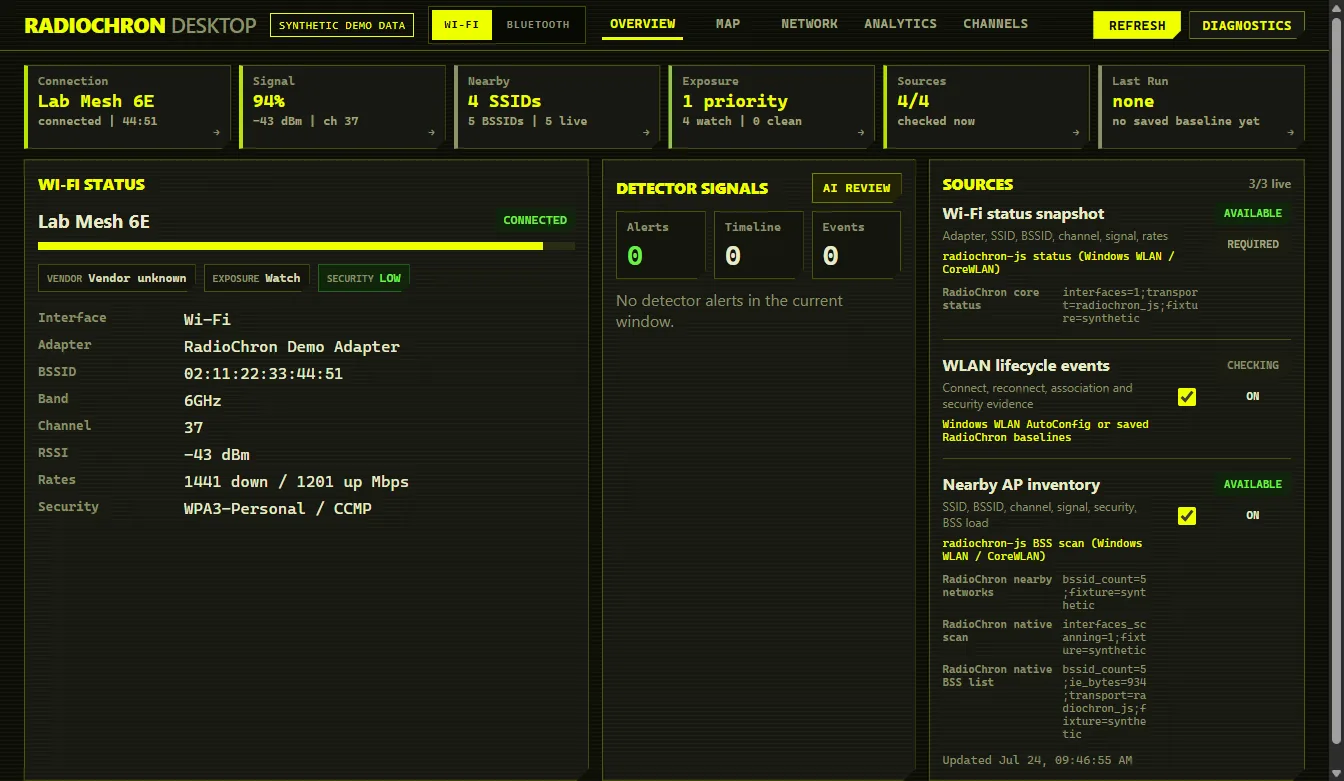
RadioChron Desktop overview showing synthetic Wi-Fi status
Overview — status, signal, exposure and collectors
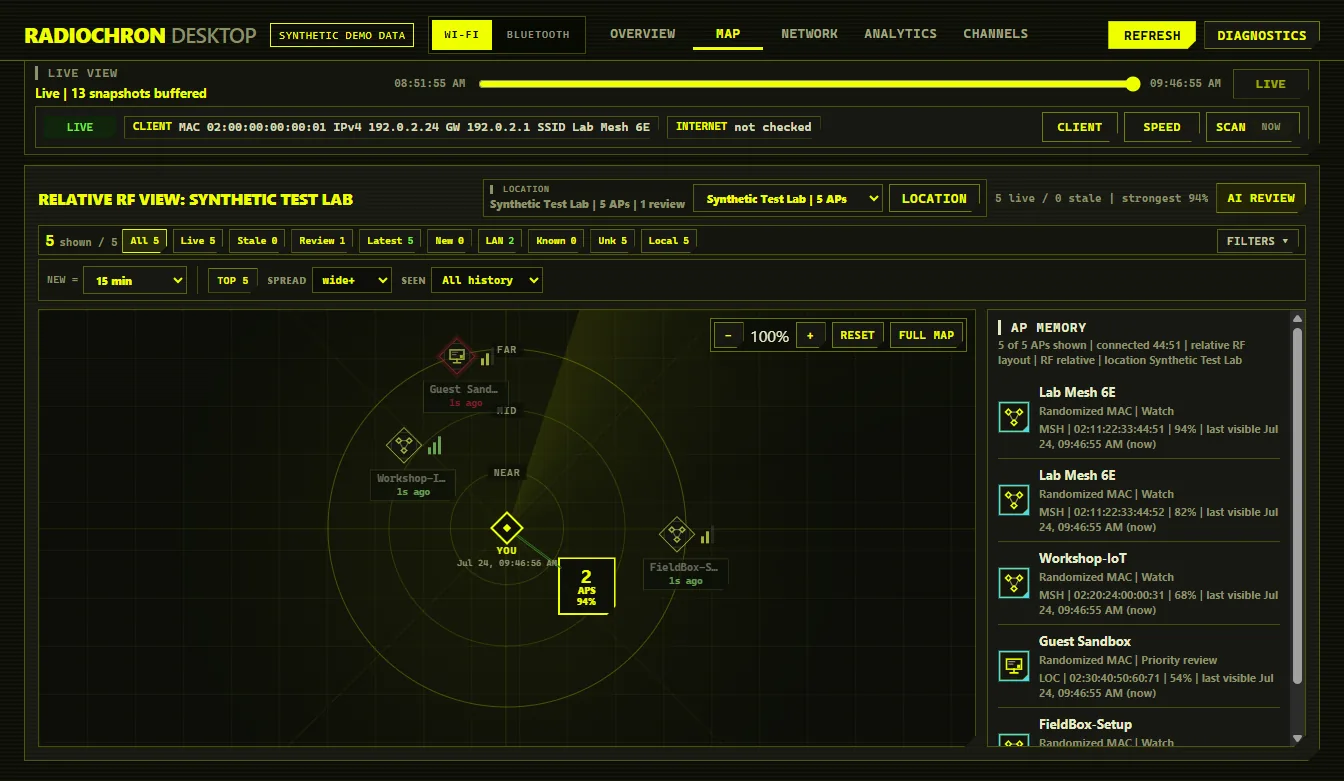
RadioChron Desktop relative RF map with synthetic access points
Wi-Fi RF map — pan, anchored zoom, fullscreen and collision layout
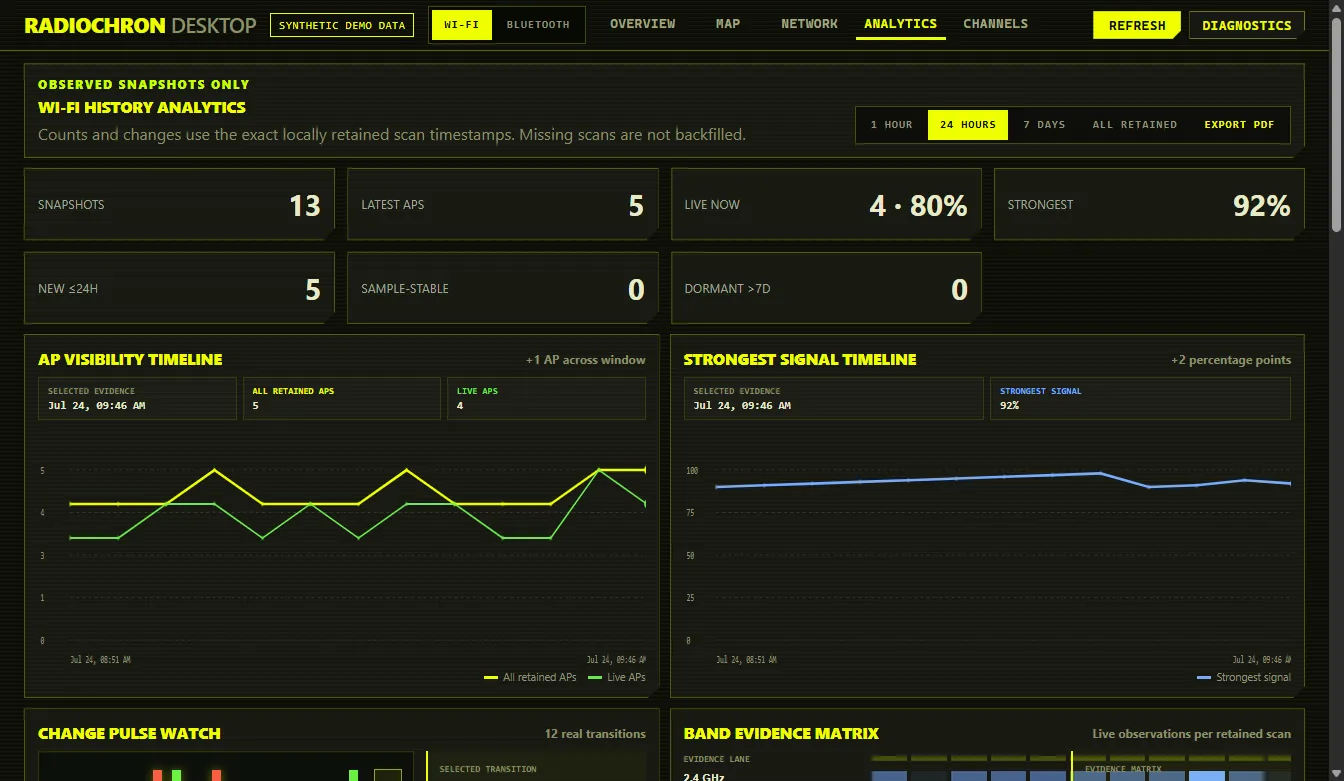
RadioChron Desktop Wi-Fi evidence timeline, pulse watch and signal matrices
Wi-Fi Analytics — timeline, transition pulse watch and AP matrices
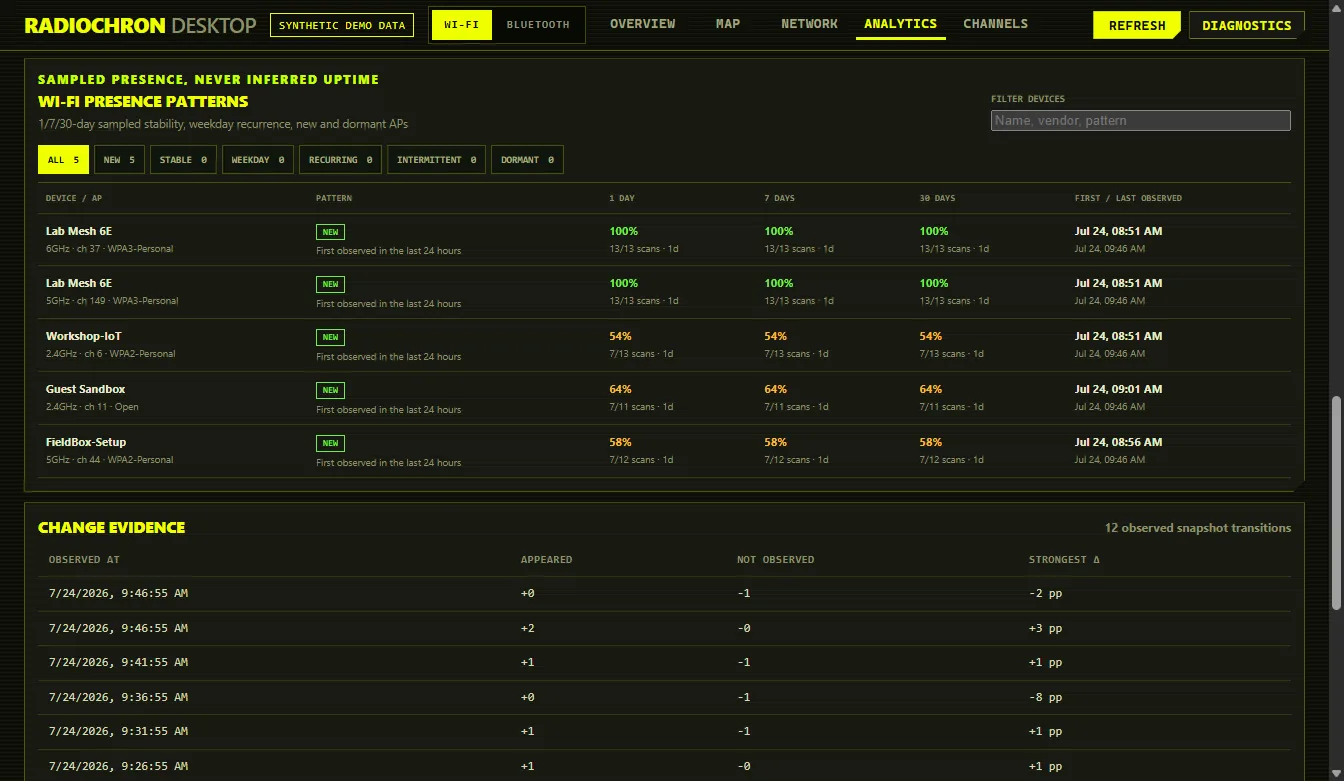
RadioChron Desktop Wi-Fi sampled presence patterns
Wi-Fi presence — filterable 1/7/30-day stability and recurrence evidence
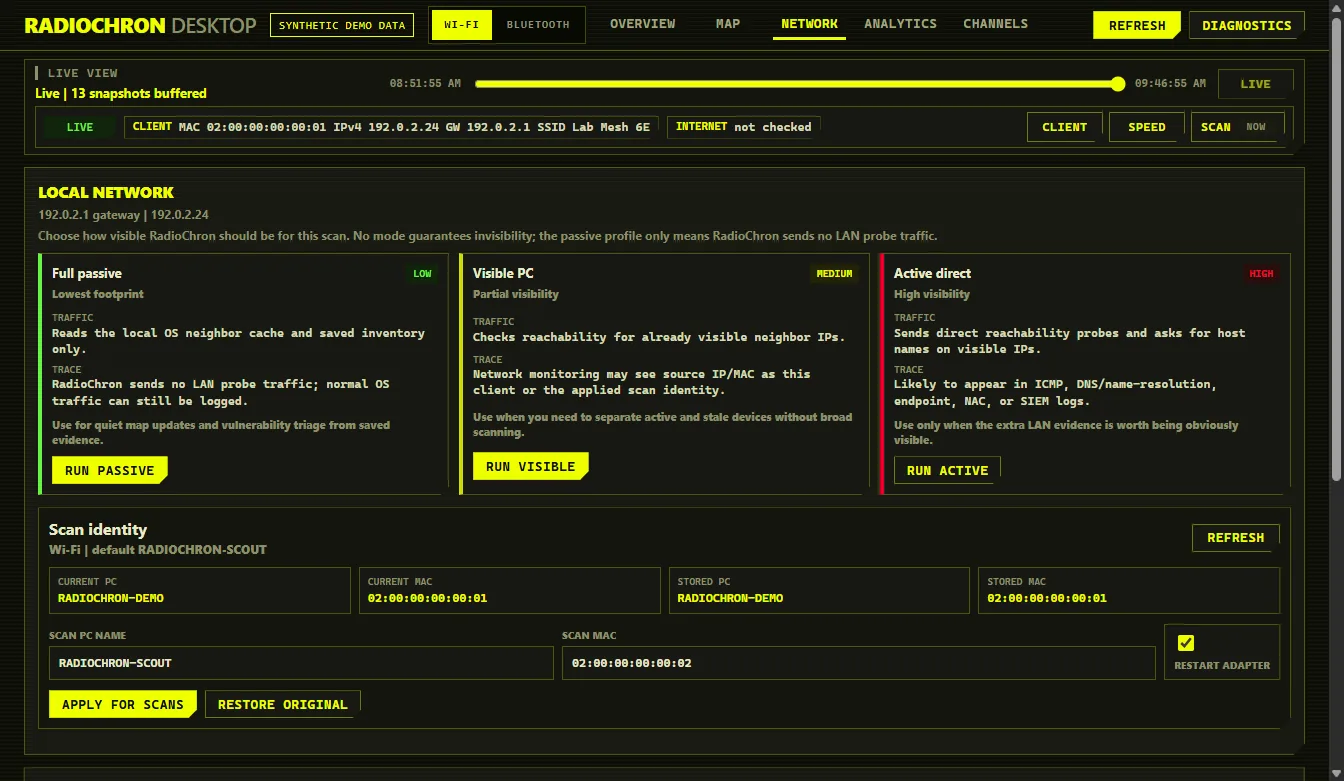
RadioChron Desktop network view with documentation-only addresses
Network — controlled local diagnostics and scan identity
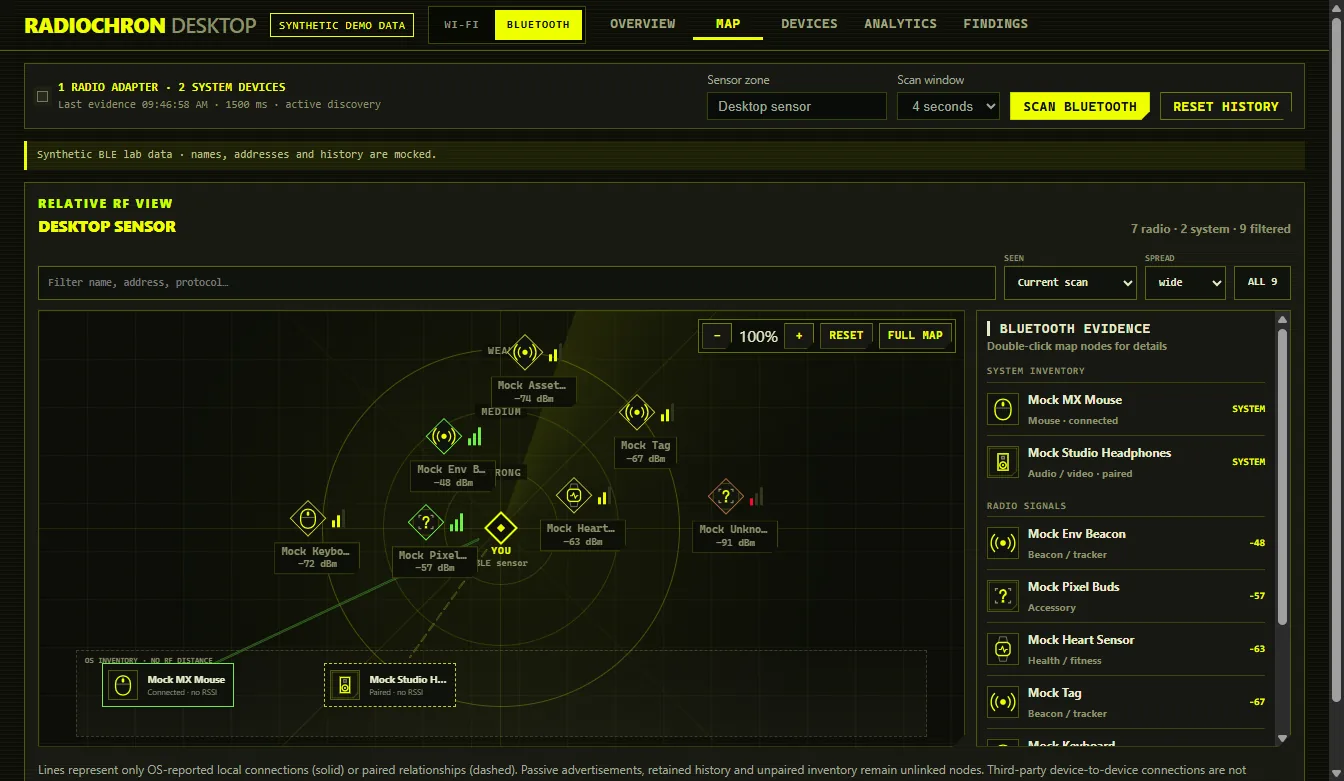
RadioChron Desktop Bluetooth RF map with synthetic devices
Bluetooth RF map — shared pan, zoom, fullscreen, filters and confirmed local links
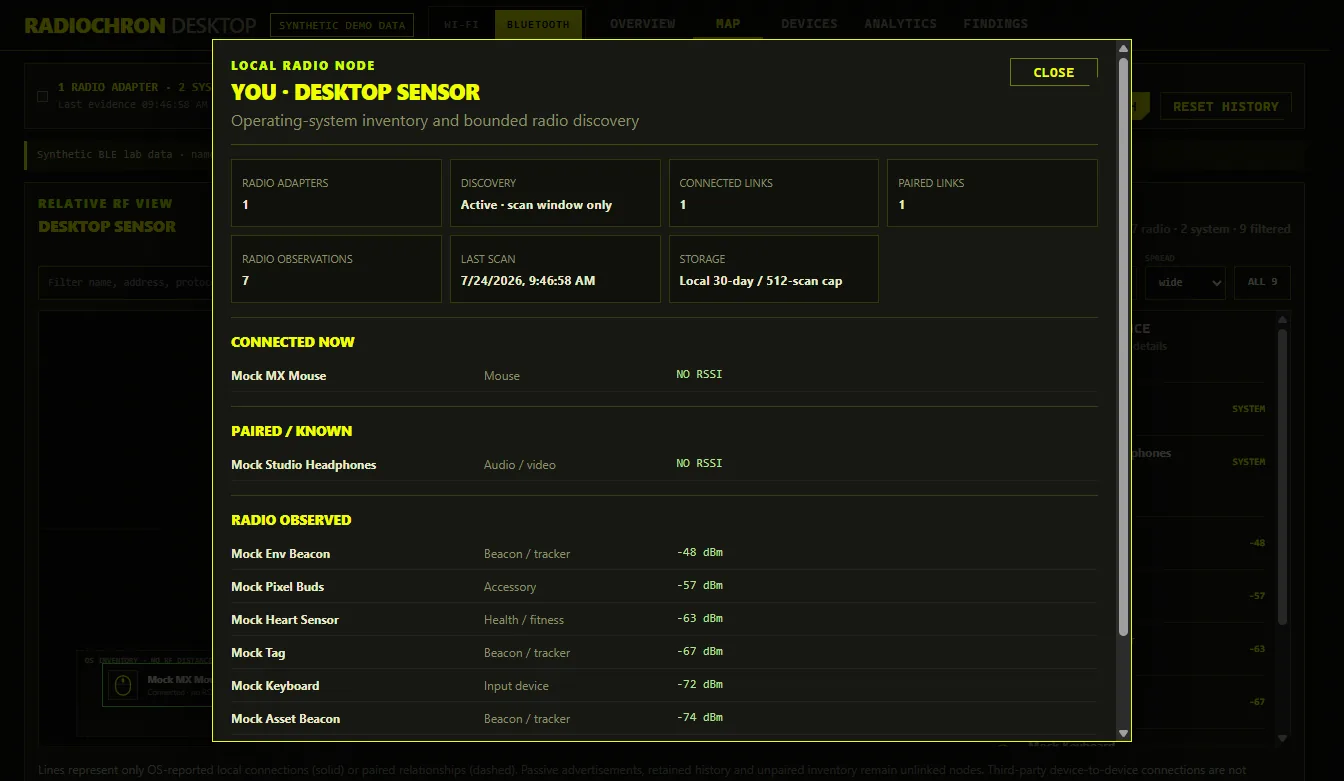
RadioChron Desktop local Bluetooth node with connected and paired relationships
Local node — connected and paired links stay distinct from unlinked radio observations
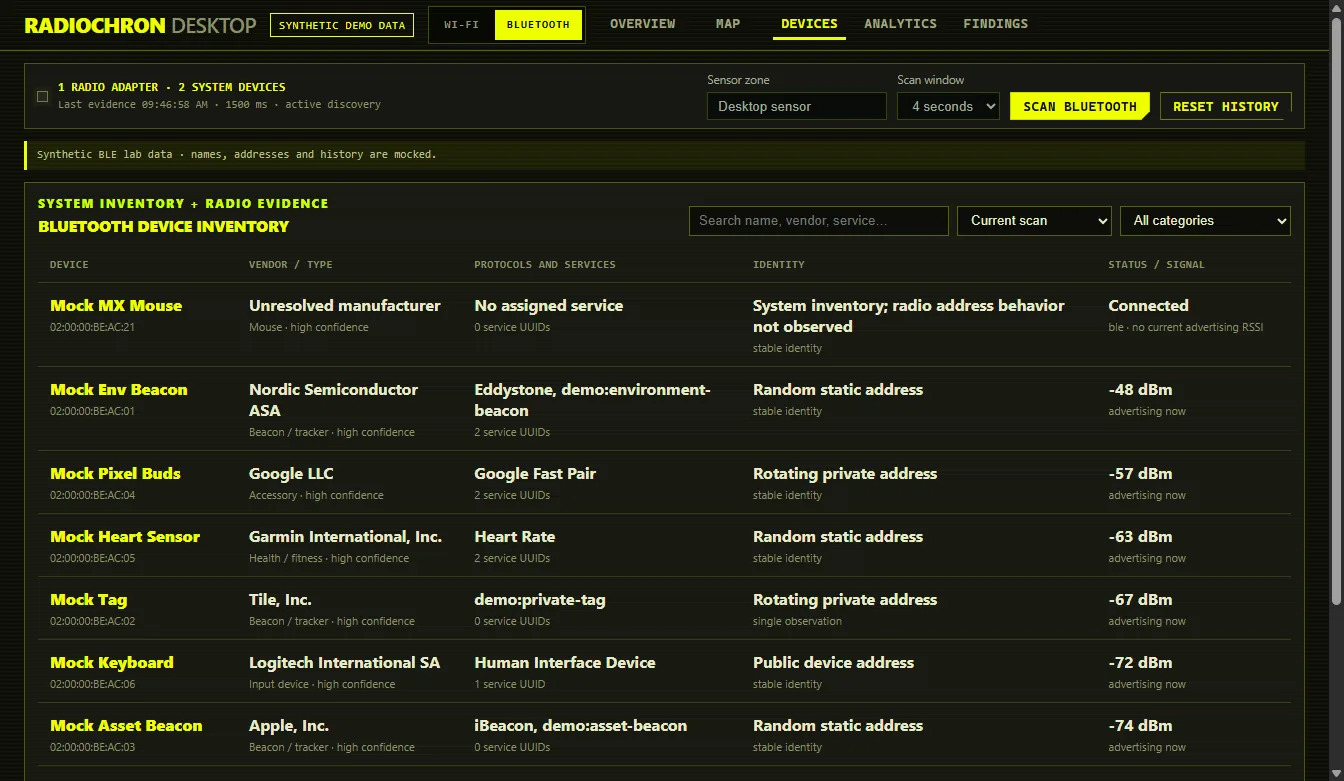
RadioChron Desktop Bluetooth device inventory with a connected mock mouse
Bluetooth devices — radio evidence plus paired and connected OS inventory
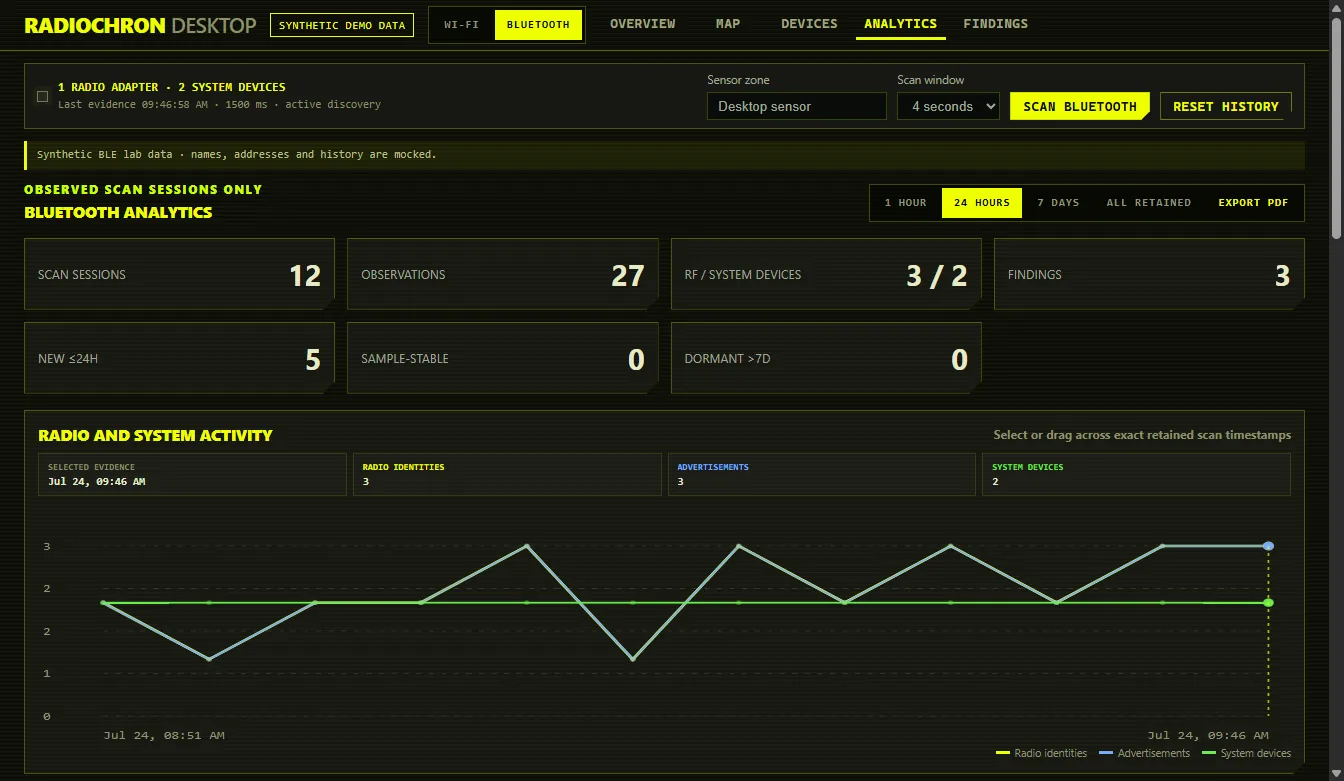
RadioChron Desktop Bluetooth evidence timeline and recurrence matrix
Bluetooth Analytics — RSSI gaps, recurrence, system inventory and detector pulses
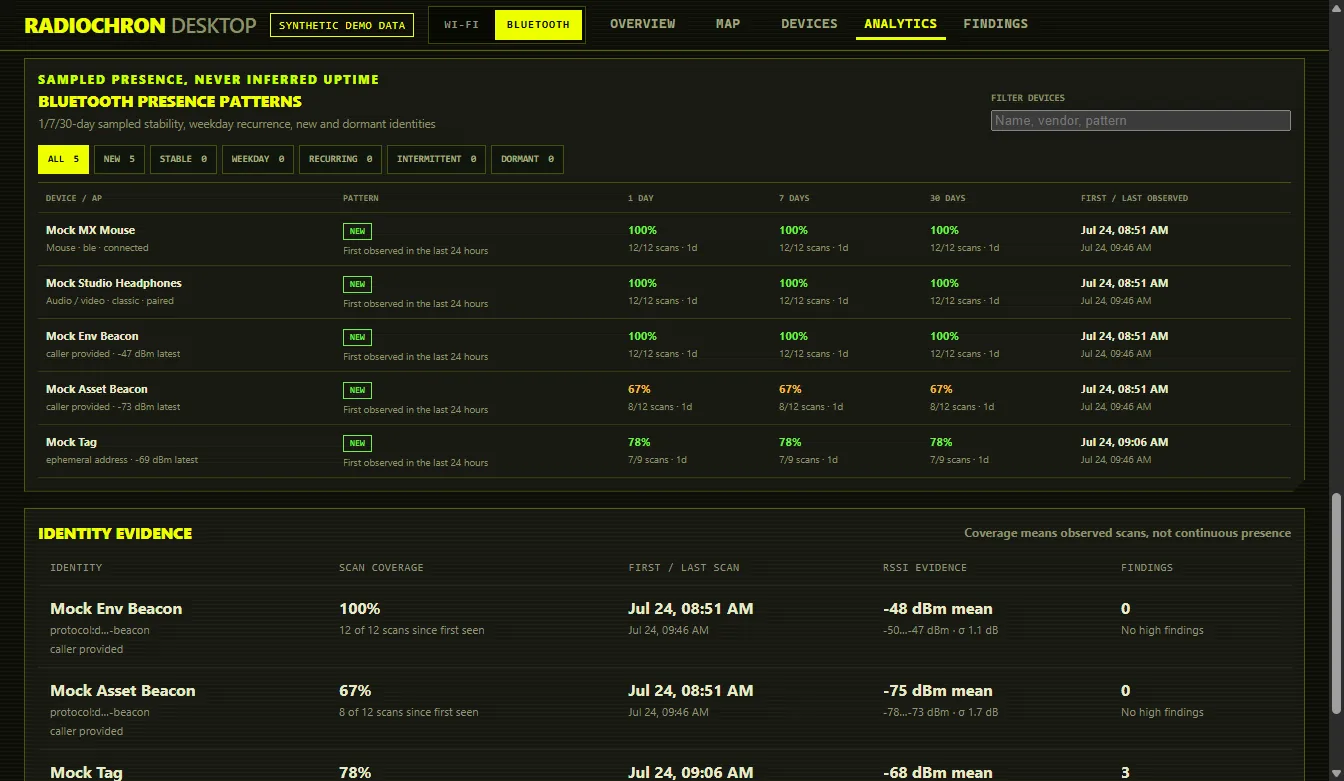
RadioChron Desktop Bluetooth sampled presence patterns
Presence patterns — new, stable, weekday, recurring and dormant evidence over 1/7/30 days
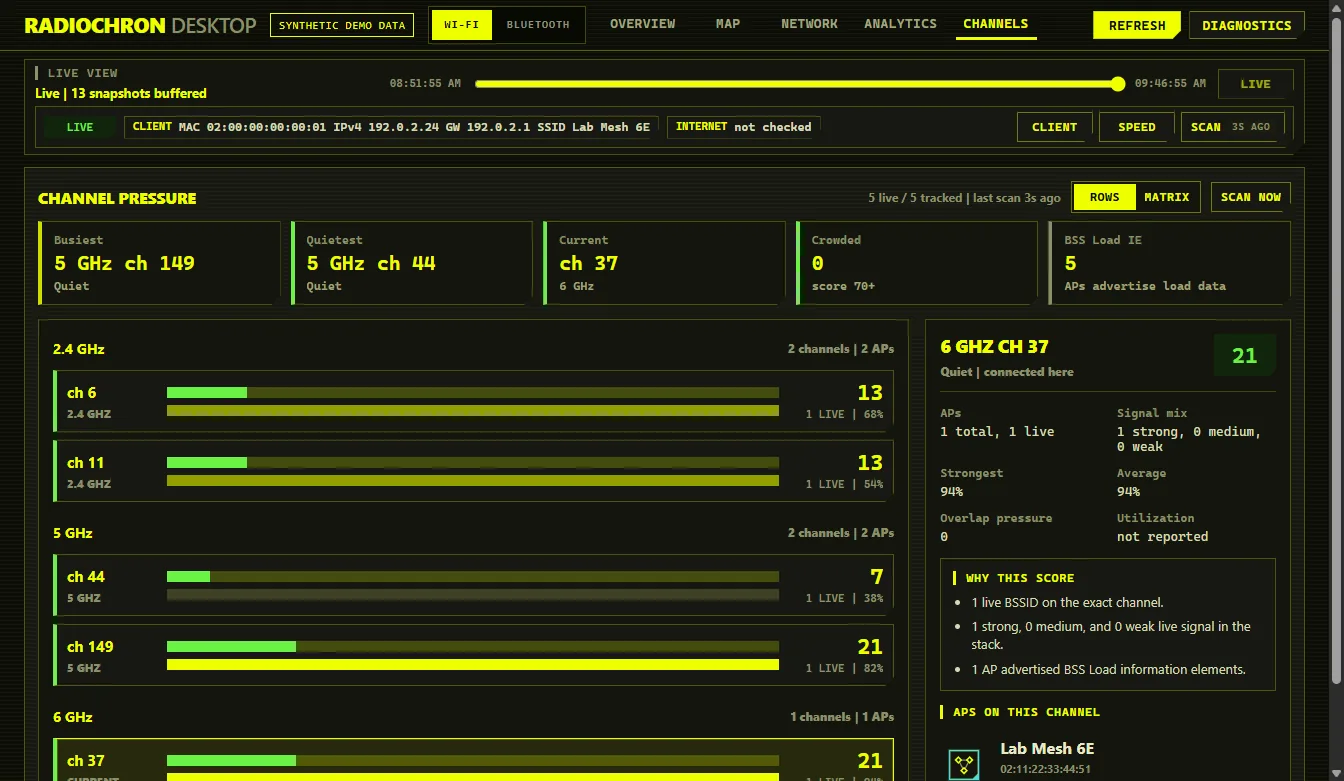
RadioChron Desktop channel pressure view with synthetic access points
Channels — congestion and overlap evidence
//: 02 — WHAT IT DOES

Capabilities

Baseline runs

Capture a timed baseline of the connection and environment, retain it locally and compare runs.

Evidence timeline

Reconnect and environment observations become a support-ready chronology, not just a snapshot.

AP inventory

SSID/BSSID, dBm, band, channel, advertised security, BSS information elements and first/last seen history.

Shared RF map engine

Wi-Fi and Bluetooth reuse one pannable, zoomable, fullscreen viewport with deterministic collision correction, search and retained-history filters. The clickable “You” node draws only OS-reported connected and paired links; advertisements and retained evidence remain unlinked nodes.

Channel pressure

Explain crowded channels using live APs, signal mix, overlap and advertised BSS load.

Bluetooth device inventory

Combine advertisements with paired/connected OS inventory, preserving real names and device categories without inventing RSSI. CoreBluetooth peer UUIDs survive private-address rotation on macOS; known Windows devices use exact OS inventory identity. Remaining rotating advertisers use short-lived, one-to-one, confidence-labelled continuity matching instead of a fake UUID. One-off private addresses stay in Analytics but do not accumulate as devices on the default Map or Devices views. Company IDs, GATT services and GAP appearances resolve from a bundled versioned database; download the snapshot or read its license and provenance.

Evidence Analytics

Explore exact retained scans through selectable timelines, transition pulse watches, signal matrices and filterable 1/7/30-day presence patterns. Missing observations remain gaps.

Evidence-rich PDF

Export Wi-Fi and Bluetooth history with real scan charts, changes, distributions, presence patterns and explicit interpretation limits. Location/LAN reports include richer RF, vendor, security and review evidence.

BLE identity history

Track stable protocol identities and confidence-labelled private-address continuity, recurrence and signal range; flag persistence, disappearance, clone or flood evidence with explicit limitations.

Local-first

No telemetry, accounts, cookies or cloud dependency. Export only when the operator asks.
//: 03 — SEPARATE REPOSITORIES, ONE CORE

Electron consumes the Node library

The desktop app imports radiochron-js like any other Node application. That npm library packages a small native Node adapter linked to the radiochron Rust IoT core.

radiochron-electron (Electron + React)
        | import "radiochron"
        v
radiochron-js (Node/npm API)
        | packaged radiochron-node-bridge
        v
radiochron (Rust IoT core)
        |-- portable Wi-Fi + BLE history/detectors
        |-- Windows Native WLAN + WinRT BLE
        |-- Linux nl80211 + BlueZ BLE
        `-- macOS CoreWLAN + CoreBluetooth

Each component has its own repository and release lifecycle. Other Node services can use radiochron-js without Electron through CommonJS or ESM, including cancelable Wi-Fi, BLE-scan and chronicle async streams.

//: 04 — DOWNLOAD BETA

Desktop installers

Download the current open-source beta 3. These builds are produced from the tested repository commit and include the native radiochron-js adapter.

Windows x64

Assisted NSIS installer (.exe)

Mac — Apple Silicon

DMG for M1, M2, M3 and newer

Mac — Intel

DMG for Intel-based Macs

Unsigned beta: Windows SmartScreen and macOS Gatekeeper may warn. The macOS builds are not Developer ID signed or notarized yet. Verify the SHA-256 file from the release page before testing.

Build it yourself

$ git clone https://github.com/sergii-ziborov/radiochron-electron
$ cd radiochron-electron
$ npm ci
$ npm run check          # typecheck + tests
$ npm run native:build
$ npm run dist:win -- --x64
$ npm run dist:mac -- --arm64